
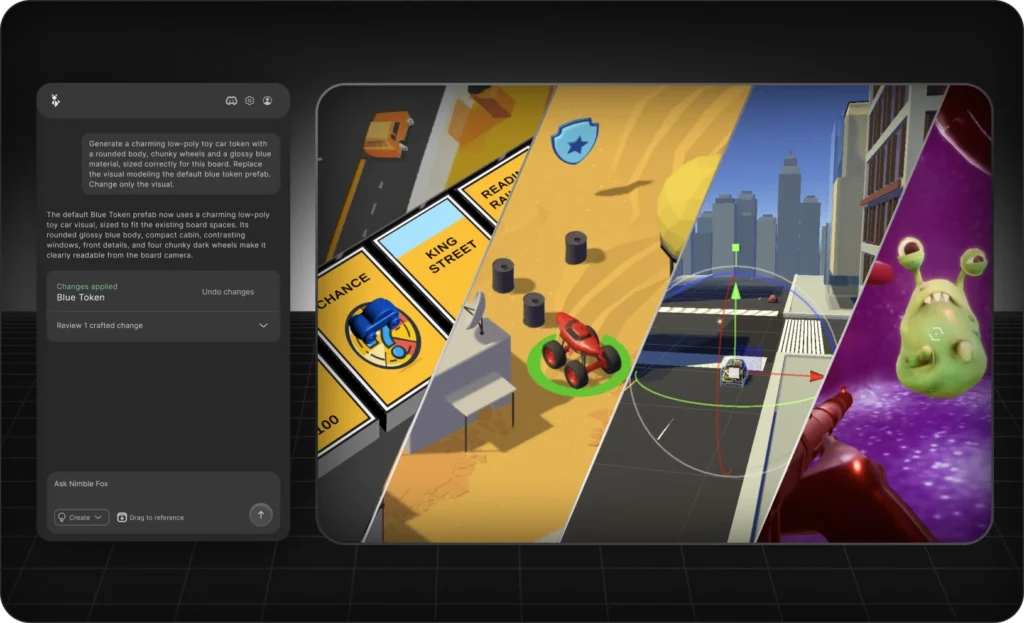
Nimble Fox AI has launched worldwide with a more useful pitch than “chatbot, but for games.” It runs inside Unity, reads the project context needed for a task, and can create scripts, GameObjects, components, assets and scene changes after the developer approves the request.
That matters because generating code is only part of game development. The annoying part often comes next: placing scripts, wiring references, creating objects, configuring components, testing the scene and cleaning up whatever broke along the way.
Nimble Fox AI launched globally on September 7, 2026 with a free tier and three paid plans. The free option makes this easy to test, but the token limits mean developers should treat it as a trial rather than an unlimited AI coding buffet.
What Nimble Fox AI can actually do in Unity
Nimble Fox says the tool can build gameplay systems, edit existing projects, assemble scenes from assets already in a project, create worlds and terrains, and generate missing content. Its help documentation says it can create assets, scripts and editor changes once a prompt is approved.
The useful distinction is that this is not just C# generation. A normal AI chat can explain how to build an inventory system. An editor-integrated assistant can potentially create the scripts, add the required objects and components, connect references and leave the result in the project ready for testing.
That does not make the developer optional. It changes the job from typing every implementation step to specifying, reviewing, testing and correcting. For prototypes and repetitive setup work, that can be a much better trade.
Nimble Fox AI pricing: free, Basic, Indie and Studio
The current pricing page lists four plans:
- Free, €0/month: 5 daily tokens, capped at 30 tokens in a rolling 30-day period.
- Basic, €20/month: 100 monthly tokens plus 5 daily tokens and priority support.
- Indie, €25/month: 100 monthly tokens plus 5 daily tokens, rollover, advanced intelligence and faster generation.
- Studio, €60/month: 100 monthly tokens plus the Indie features and custom asset generation.
Nimble Fox says an average message uses about one token, while more complex requests can consume more. New 3D model generations on Studio cost one token per generation.
The interesting part is that Basic, Indie and Studio all list the same 100 monthly tokens. The higher tiers mainly buy capability, speed and rollover. For many solo developers, the €25 Indie tier looks more interesting than Basic if the free version proves useful, because the extra €5 adds features that could reduce retries.
The free tier should be used as a controlled test
Five daily tokens sounds generous until the 30-token rolling monthly cap enters the room.
Use those free tokens on a feature you already understand. Ask Nimble Fox AI to create a stamina bar, interaction trigger, pickup component or another bounded system. Then inspect the changes, run the scene and measure how much cleanup remains.
Do not test it with “make my dream RPG.” That teaches you almost nothing. Smaller tasks are easier to review, easier to revert and much easier to blame when something catches fire.
This also fits a broader trend we covered in our Unity 2026 development report breakdown: getting to testable prototypes faster matters more than producing the longest possible feature list.
Three production caveats matter
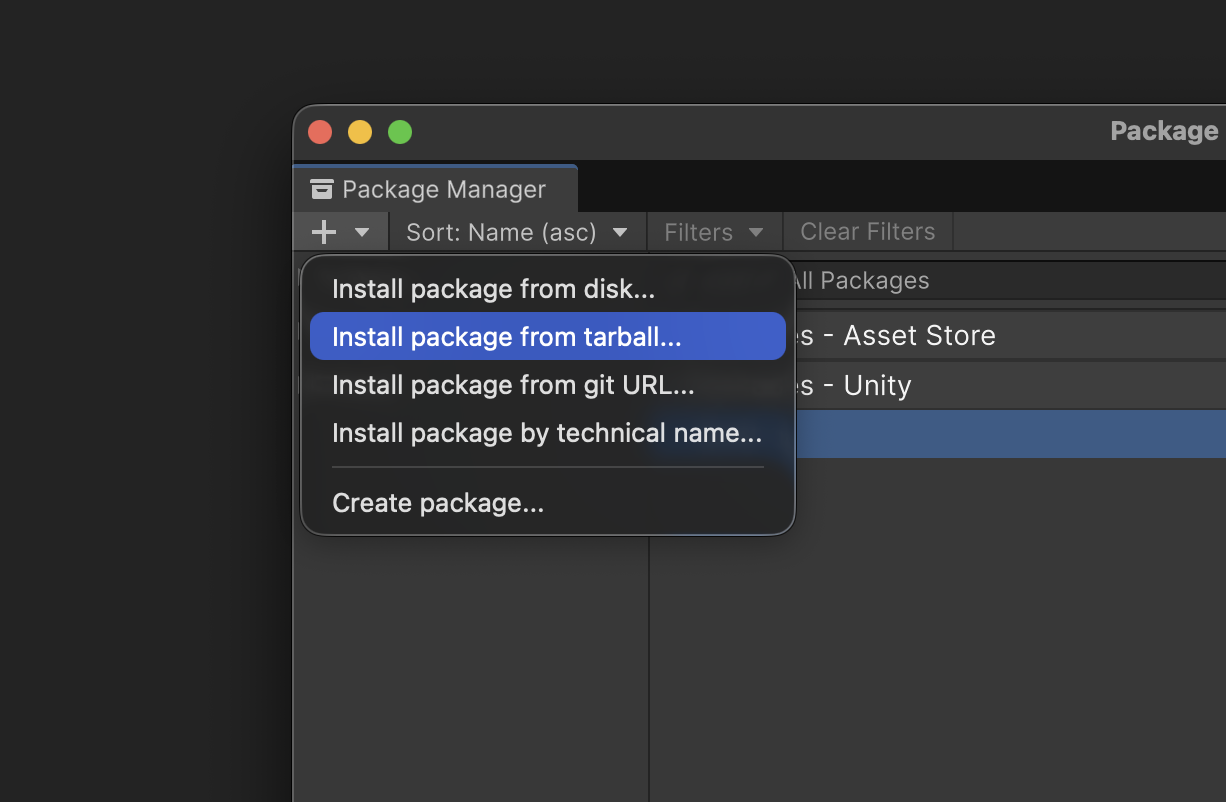
First, Unity version compatibility is not clearly documented. The installation guide shows how to add Nimble Fox through Unity Package Manager using a downloaded tarball, but the public help page does not currently provide a clear Unity version support matrix. Test it in a branch or disposable project before putting it into a production stack.
Second, AI output still needs engineering review. Nimble Fox’s terms say output can be inaccurate or incomplete and that users are responsible for validating it. A script compiling successfully is not proof that it allocates cleanly, scales well or fits your architecture.
Third, read the data terms before connecting confidential work. The FAQ says the tool only reads files needed for the requested task and that user data is not used to train models. The terms also explain that submitted content may be processed by Nimble Fox and third-party AI service providers to deliver the service. For unreleased commercial code, client projects, licensed third-party assets or NDA work, read the current terms and privacy policy before connecting the project.
Commercial use is allowed, but AI output is not exclusive
Nimble Fox’s terms say that, subject to compliance with the service terms, the company assigns to the user any rights it may have in AI output generated from that user’s prompts. That output can be used for lawful commercial purposes.
The important caveat is that generated output is not guaranteed to be unique. Company-provided media assets also have separate restrictions: they can be used and modified in projects, but cannot be redistributed as standalone assets or repackaged into a competing asset database.
How to install Nimble Fox AI in Unity
The current setup uses Unity Package Manager. Download the Nimble Fox package, choose Install package from tarball, select the downloaded package, then open Nimble Fox inside Unity and sign into your account.
Is Nimble Fox AI worth trying?
Yes, especially because the evaluation starts at €0.
The strongest use cases are scoped gameplay systems, prototypes, scene assembly, repetitive setup and first-pass implementation. The weakest use case is handing an entire production to a probabilistic tool and assuming “Done” means “shippable.”
Use the free allowance to measure real time saved. If the tool consistently removes work, Indie currently looks like the most interesting solo-developer tier. Studio only earns its €60 price when custom asset generation is something you will genuinely use.
Nimble Fox has the right idea: AI becomes more useful when it can operate where the game actually exists, not just where the chat box exists.
The fox still needs supervision. Apparently even artificial wildlife should not be allowed to push directly to production.
Try Nimble Fox from the official site

