
The biggest problem with AI coding agents in Unity has never been that they cannot write C#. They can. The problem is that they often know just enough Unity to confidently build the wrong thing.
Ask a general-purpose coding agent to make a settings screen and it may reach for the wrong UI system. Ask it to fix a URP renderer feature and it may mix old pipeline assumptions with Unity 6. Ask it to set up IAP, ads, tilemaps, TextMeshPro fallbacks or a SpriteAtlas and you can end up spending more time supervising the “help” than doing the work yourself.
Unity is now attacking that problem directly.
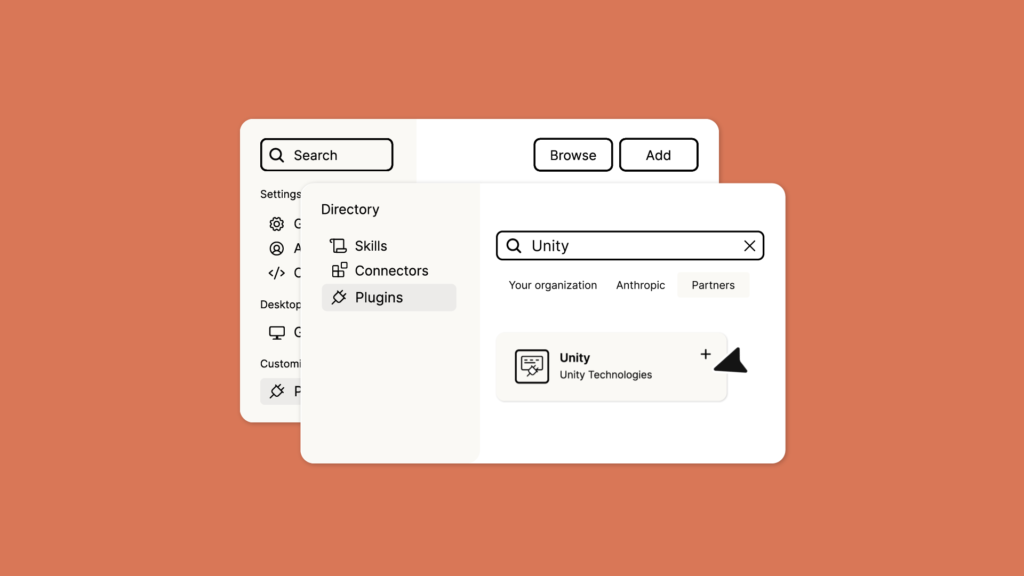
The company’s new first-party agent plugin packages Unity-authored engineering skills alongside the Unity CLI and live Editor control. Unity originally announced it through Claude Code, but its current documentation lists support for Claude Code, Codex and Grok. The practical idea is simple: instead of making the agent reconstruct Unity best practices from random web pages, old forum posts and whatever survived in model training, give it instructions written by the people who make the engine.
For solo developers and small teams already using coding agents, that is potentially a much bigger deal than another “AI can generate code” demo.

What the Unity plugin actually installs
Unity says the plugin launched with 29 native skills, with more planned over time. It also connects the agent to the Unity CLI and Unity’s MCP tooling for live Editor interaction.
Those skills are not fluffy prompt templates. The initial set covers jobs Unity developers repeatedly burn hours on:
- creating and configuring Unity projects
- package management
- UI Toolkit, uGUI and legacy IMGUI routing
- Sprite Editor, atlases, tile palettes and RuleTiles
- URP post-processing, Shader Graph and Render Graph validation
- audio mixers and audio optimization
- AI Navigation and 3D physics debugging
- Unity IAP, LevelPlay mediation and live-service systems
- multiplayer and platform workflows
- localization and text handling
One of the smartest details is that some skills act as routers rather than blindly generating code. Unity’s general UI skill, for example, is designed to identify which UI framework the project is actually using before it starts writing interface code.
That sounds boring until you have watched an agent enthusiastically create a second UI architecture inside an existing production project. Then it sounds beautiful.
The real win is not more intelligence — it is less guessing
Think of a strong coding model as an extremely capable contractor arriving on day one. It can reason, write code and move quickly, but it does not automatically know your engine conventions, project architecture or the obscure little rules that determine whether a Unity feature actually works.
Unity uses almost exactly that contractor analogy in its announcement. The official plugin gives the agent engine-specific context before it acts.
For example, Unity’s Render Graph skill can review a Unity 6 ScriptableRendererFeature for resource wiring, descriptor usage, execution structure and material binding. Its TextMeshPro optimization skill includes fallback atlases, CJK fonts, padding and memory profiling. The IAP skill covers the current pending-purchase flow, receipt validation, restoration and platform extensions.
This is the difference between “write me some Unity code” and “perform this Unity task using the current engine’s intended workflow.”
Why Codex users should care even though the announcement started with Claude
The first announcement centered on Claude Code, but Unity’s current docs explicitly describe the plugin as working with Claude Code, Codex and Grok. Unity’s own GitHub repository also provides Codex installation commands.
That matters because the useful part here is not tied to one model. Unity is beginning to separate engine knowledge from agent intelligence.
If that approach holds, developers can choose whichever coding agent is strongest for a given task while still giving it the same first-party Unity operating manual. That is much healthier than every AI vendor maintaining its own half-correct interpretation of Unity.
Live Editor control changes the kind of task you can delegate
Code generation is only one piece of game development. A lot of Unity work lives inside scenes, GameObjects, serialized assets, package settings, import settings and Editor tooling.
Unity’s CLI and MCP direction matters because it gives an agent a path to work with that environment rather than merely dumping C# files into the project.
Unity describes its CLI skill as capable of driving a live Editor, creating and modifying GameObjects, editing scenes and assets, inspecting the hierarchy, running C#, managing Editor installs, builds and logs.
That opens the door to jobs such as:
- “Find why these colliders stopped firing after the prefab refactor.”
- “Create a proper tile palette from these sprites.”
- “Set up rewarded ads using the current LevelPlay integration.”
- “Review this renderer feature for Unity 6 Render Graph problems.”
- “Optimize the import and mixer configuration for this audio folder.”
Those are production tasks, not autocomplete tricks.
The part solo developers should be most excited about
Small teams have a documentation problem. You often know how to solve something once, then six months later you have to rediscover half the workflow because the API changed, the plugin updated or you simply forgot which checkbox mattered.
First-party agent skills can turn a chunk of that rediscovery into reusable institutional knowledge.
That does not mean an agent suddenly understands your game. It means it can arrive with better baseline knowledge of the engine. Your project still needs its own documentation for architecture, naming conventions, gameplay rules, custom assets and the decisions that make your codebase yours.
The powerful setup is the combination: Unity’s official engine knowledge + your own project knowledge + a strong coding agent.
The catch: this is not a magic “build my game” button
There are several important limitations.
First, the plugin currently requires Unity 6.0 or later. If your production game is still on an older LTS version, do not assume every skill applies cleanly.
Second, Unity explicitly says this is not an Asset Store package and you do not install it through Package Manager. It lives in the agent workflow.
Third, first-party instructions reduce a class of mistakes; they do not eliminate reasoning errors. An agent can still misunderstand your intent, modify the wrong prefab, choose a technically valid design you dislike, or produce a change that passes compilation and breaks game behavior.
Version control remains non-negotiable. Review diffs. Keep scenes and prefabs recoverable. Test on device. Treat autonomous Editor access like giving a junior developer very fast hands: useful, but not a reason to throw away source control and go to lunch for six hours.
What about existing community Unity MCP tools?
Community MCP servers and custom automation are not suddenly useless. Many already expose broader commands, custom integrations or workflows tailored to specific teams.
The first-party plugin changes the baseline. Before, developers often had to choose between a capable agent with incomplete Unity knowledge and a collection of community bridges. Now there is an official reference layer that other tooling can complement.
For a new developer, starting with Unity’s supported path makes sense. For an established team with custom MCP infrastructure, the interesting question is whether Unity’s skills can become the engine-knowledge layer underneath your existing automation.
ZerotoBeast take: this is the AI feature Unity actually needed
Generating a tree, texture or dialogue line is flashy. Teaching an agent how to correctly navigate the ugly, repetitive, version-sensitive work of real game production is less flashy — and potentially far more valuable.
Unity is effectively saying: if developers are going to use agents anyway, the engine should stop making those agents guess.
That is the right direction.
The next test is maintenance. These skills only stay valuable if Unity keeps them synchronized with engine changes, services and packages. If that happens, a Unity project can become dramatically easier for coding agents to operate without every studio independently rebuilding the same instruction library.
And for solo developers? That means less time explaining to the robot why the robot’s perfectly valid code is completely wrong for Unity.
Related: Unity Autumn Sale: how not to waste money on 300+ discounted assets.
Read Unity’s official agent-plugin documentation
Sources / Official Links
Unity — Official Unity Plugin for Claude Code
Unity Docs — About Unity’s plugin
Unity Technologies — unity-agent-plugin on GitHub

