
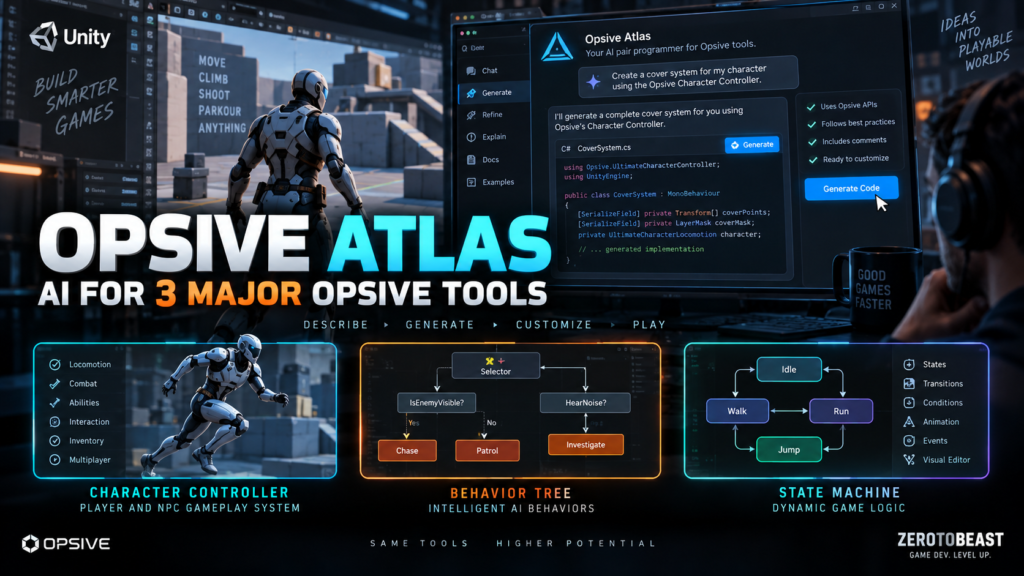
Opsive Atlas is the kind of AI tool that gets more interesting the deeper your project becomes. It is not trying to replace your whole Unity project with one magical prompt. Instead, it is built around Opsive’s own frameworks, so it can answer product questions, plan implementation work, and generate code that already knows the base classes, lifecycle methods, attributes, and APIs those frameworks expect. That makes the pitch much more practical than “AI writes C# now.” Explore Opsive Atlas.
The biggest selling point is context. A general coding agent may know C# and Unity, but it still has to infer how a third-party framework wants abilities, tasks, conditions, shared variables, or cleanup logic to be structured. Opsive Atlas is designed specifically to remove that translation layer. It checks the framework, looks at a bounded slice of the project API, prefers built-in functionality when it already exists, and keeps generated files as previews until the developer chooses to apply them. See how Opsive Atlas works.
What problem does Opsive Atlas actually solve?
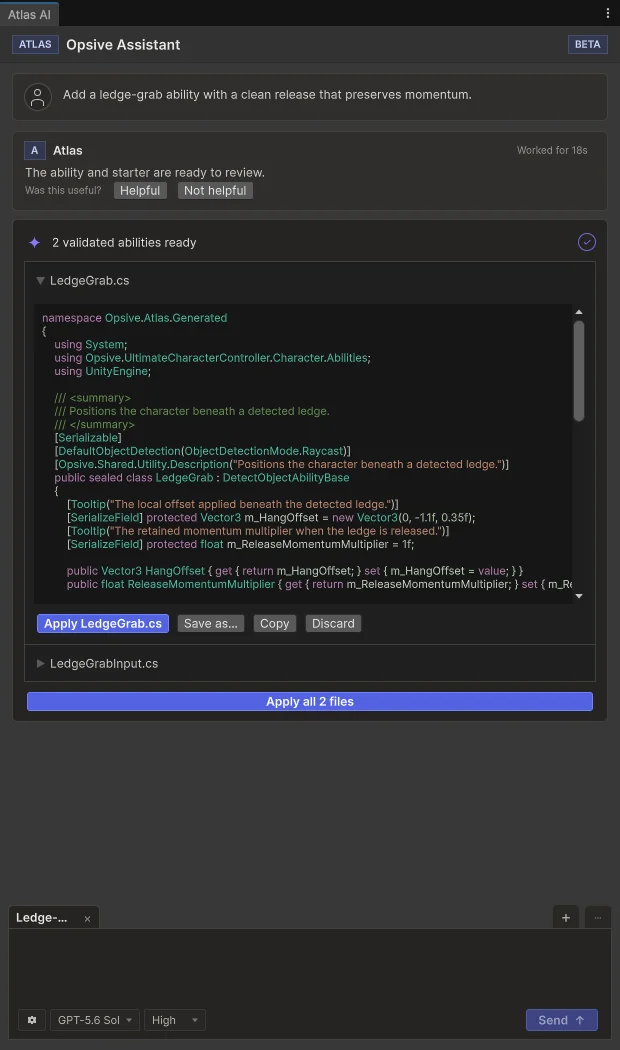
If you have ever bought a serious framework and then spent two hours searching documentation for the one correct extension point, Opsive Atlas is aimed directly at that pain. You can ask how a system works, attach editor context, generate a missing framework-specific class, review the result, and send a compiler error back for another pass. The value is not raw code generation. The value is reducing the time spent translating your gameplay idea into “the way this particular framework expects the code to be written.” Open the Opsive Atlas page.
That matters because middleware mistakes are expensive. A custom class can compile perfectly while still using the wrong lifecycle, failing to clean up temporary state, fighting another ability for ownership, or duplicating something the framework already provides. Opsive Atlas validates the structure before the file reaches you and keeps the output staged until you explicitly apply it. That is a much healthier workflow than letting an agent spray files into a production project and hoping the Console stays quiet. Review Opsive Atlas at Opsive.
Three major Opsive tools are supported
Owners of Behavior Designer Pro can use the assistant to understand existing trees and generate Action, Conditional, Decorator, and Composite tasks for GameObject or ECS workflows. The current product requires version 3.3.0 or newer for the Atlas integration, and Opsive’s September 10 release added official Unity 6.6 support in version 3.3.3. The direct Personal license is currently listed at $145 per seat, while the Professional license is listed at $399 per year. View Behavior Designer Pro at Opsive.
Owners of State Designer get the same framework-aware approach for finite state machines, including custom Actions and Conditions that are wired into the state lifecycle. Version 1.3 added Atlas access in August, while version 1.3.3 followed on September 10 with Unity 6.6 support and more SharedVariable and iteration improvements. The current Opsive shop lists the Personal product at $145. View State Designer at Opsive.
Owners of Ultimate Character Controller can ask about character setup or generate custom Version 3 abilities, item abilities, starters, and stoppers. Opsive’s current Atlas documentation requires version 3.3.7 or newer, and it explicitly warns that generated local gameplay does not magically create networking authority or replication. The controller currently lists for $249 in Opsive’s store. View Ultimate Character Controller at Opsive.
Opsive Atlas currently runs through Codex
Right now, Opsive Atlas needs Codex behind it. Opsive says the assistant drives an existing local subscription on Windows or macOS, adds no extra Opsive per-request charge, and keeps the provider credentials on the machine. You still need the coding agent installed and signed in, so “included” does not mean the complete AI stack costs nothing. Check Opsive Atlas requirements.
Opsive says additional provider routes are coming later, including a direct Opsive subscription option and bring-your-own-key support. For developers already using agentic workflows, this is also worth reading beside our earlier coverage of Unity’s first-party coding-agent skills. The interesting trend is clear: game engines and middleware vendors are starting to give agents official instructions instead of leaving them to reverse-engineer the correct workflow from forum posts. Explore Opsive Atlas.
The privacy story is better than “upload the whole project,” but read the fine print
Opsive Atlas does not claim to ship your entire project to the provider. Opsive describes the request context as a bounded summary of the relevant public API surface plus selected task files. Its documentation also says the assistant can automatically include up to five eligible user-authored scripts from the Assets folder, with a limit of 8,000 characters per file, plus collected project instructions. That is far more scoped than uploading a repository, but teams handling confidential code should still review exactly what context is being included before using it on sensitive work. Read the Opsive Atlas privacy and workflow details.
Where this can save real development time
The best use case for Opsive Atlas is not “make my game.” It is a narrower request where framework knowledge is the bottleneck: build a patrol task that respects the behavior-tree lifecycle, create a state action that exposes the right SharedVariables, or generate a ledge-grab ability that starts and stops cleanly inside the character controller. Those are exactly the jobs where a developer can lose an evening to boilerplate and framework archaeology even when the gameplay idea itself is simple. Try the workflow described by Opsive.
The tool should be even more valuable for small teams that already own one of the supported systems but do not have every Opsive API memorized. A designer can ask questions without generating code, a programmer can plan before applying files, and both can inspect the output before it touches the project. That human review step is important because generated code can still be logically wrong even when it compiles. See the Opsive Atlas review workflow.
Important limitations before you install it
Opsive Atlas is framework-aware, not omniscient. Opsive explicitly tells developers to test lifecycle cleanup, interruption behavior, state ownership, animation, saving, networking authority, and interactions with other abilities after generation. In other words, the assistant can remove boilerplate and reduce documentation hunting, but it does not replace gameplay engineering or QA. Read the official Opsive Atlas guidance.
The second limitation is cost context. The assistant itself adds no extra Opsive fee for owners, but access unlocks per supported product. If you own only State Designer, that does not unlock task generation for Behavior Designer Pro or ability generation for Ultimate Character Controller. Buying a $145 or $249 framework just to reach the AI helper would be backwards. Buy the framework because you need the framework, then treat the assistant as a productivity multiplier on top. Check which Opsive Atlas features your ownership unlocks.
Is Opsive Atlas worth using?
If you already own one of the supported Opsive systems and already pay for Codex, yes, this is an easy tool to justify testing. There is no extra Opsive usage fee, the output stays reviewable before application, and the entire product exists to solve the annoying gap between “the AI knows C#” and “the AI knows this framework’s actual rules.” Download Opsive Atlas.
If you do not own the underlying framework, the answer changes. Opsive Atlas is not a standalone replacement for a behavior tree system, state machine tool, or character controller. It is an accelerator for those products. That distinction is exactly why the tool is interesting: Opsive is not selling a generic chatbot with a Unity skin. It is trying to make expensive middleware easier to understand, extend, and keep moving. For teams already invested in that ecosystem, that can be worth a lot more than another autocomplete box. Explore Opsive Atlas.
Sources and official links
- Opsive Atlas official product and download page
- Behavior Designer Pro Atlas documentation
- Ultimate Character Controller Atlas documentation
- State Designer 1.3 release notes
- State Designer 1.3.3 release notes
- Behavior Designer Pro 3.3.3 release notes
- OpenAI Codex product page
Bottom line: if the supported Opsive framework is already part of your project, this is exactly the kind of AI feature that can earn its keep by removing framework-specific friction instead of pretending the framework does not exist. Get Opsive Atlas from Opsive.

